Ops NEXUS Suite
Ops NEXUS Suite connects flight, passenger, baggage, airspace, and ground-operation data into one operational picture — giving teams the context to anticipate risk, coordinate decisions, and act while there is still time.
See how it holds together ↓Every inbound flight becomes
one arrival, one gate, one window.
The hub sees it as one wave.
Ops NEXUS Suite
Departing
Operational Control
Ops NEXUS doesn't replace
what you already run.
It connects it.
Operational Control
Ops NEXUS Suite pulls flight, passenger, baggage, and airspace data into one operational picture — sitting alongside your existing network controller, turnaround, DCS, flight-planning (Lido, Lufthansa Systems), maintenance, ACARS, tower/ATC, and finance systems, not replacing them.
Teams act on one shared picture instead of reconciling separate systems by hand.
The Departure Challenge
Departing
Prioritised Operational Awareness
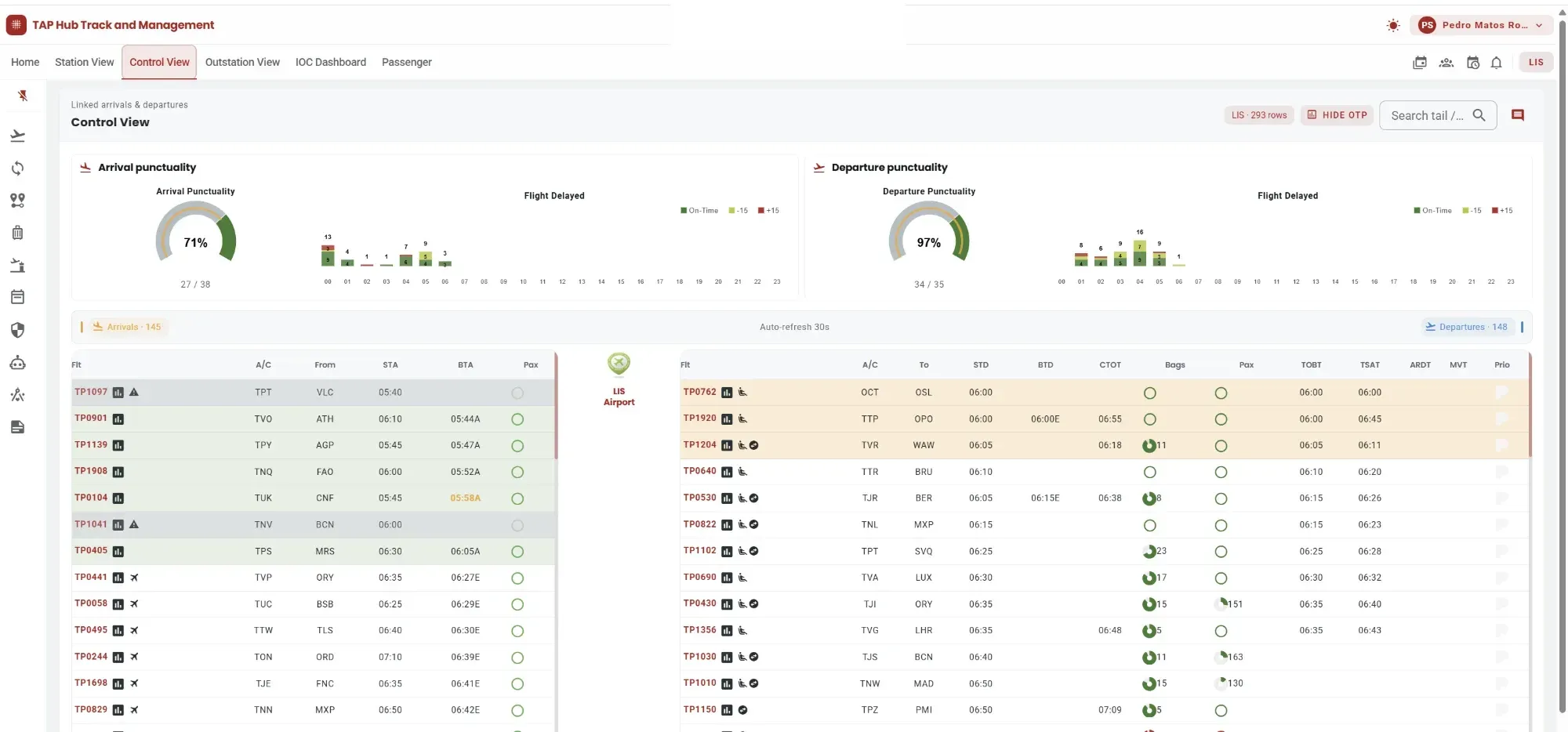
Departing turns six systems' worth of signals into one answer: what needs attention before this aircraft leaves.
The Departure Journey
What Teams See
Passenger Transfer (D2D) monitoring surfaces at-risk connections with a two-tier alert, before a transfer is actually missed.
Baggage transfer (H2H) applies the same two-tier risk logic to inbound-outbound bag connections moving through the hub.
TOBT, TSAT, CTOT, and ARDT target times sit next to stand and minutes-to-departure, with colour-coded thresholds marking a shift from plan.
Passenger and baggage status - authorised, processed, boarded - visible down to the individual seat, not just a gate-level count.
Local, transfer, rush, and unauthorised baggage counted against minutes-to-ETD, so a baggage exception is visible before it becomes a delay.
Station managers, hub controllers, and airside Customer Care work from the same connection and readiness data - not a summary relayed between systems.
From Visibility To Intervention
Operational Impact
Earlier visibility into a departure at risk is what turns a possible delay into a protected one.
Part Of Ops NEXUS Suite
The sources feeding Departing's picture — flight plan, DCS passenger and baggage data, ACARS, ground operations, dispatch — are the same operational systems GroundOps and Dispatch teams act on further along the journey, not a separate view built apart from them.
The Anticipation Challenge
Flying
Prioritised Connection Risk
Flying turns an evolving flight time into an early warning for the connections riding on it.
The AET/EET prediction engine currently forecasts airborne flight time. Taxi-out prediction is being added to sharpen the forecast further; taxi-in and turnaround-time prediction are not currently part of the model.
What Teams See
The Passenger Transfer Forecast Engine flags at-risk connections while the inbound flight is still airborne, built on the AET/EET trip-time forecast.
The Baggage Transfer Forecast Engine applies the same forecasting to baggage connections riding on the same flight.
Alerts distinguish a connection that's at risk from one that isn't, so attention goes where it's actually needed.
EET is a live trip-time prediction that moves as the flight does, shown on the IOC Dashboard as it updates.
A flagged connection reaches transfer and ground teams before the aircraft carrying it has landed, not after.
The same forecast that flags a connection here is the one HubTM and GroundOps act on further along the journey.
Part Of Ops NEXUS Suite
The same AET/EET forecast and transfer-risk alerts that flag a connection here are what Departing's readiness picture and GroundOps' ground teams act on downstream — one forecast, not a separate calculation for each stage of the journey.
The Arrival Challenge
Arriving
Operational Readiness
Arriving turns a changing estimate into a ground operation that's ready when the aircraft is.
Dispatch and Arrival Management work from data that keeps itself current — a NOTAM logged once automatically updates the airspace-restriction view dispatch relies on, station by station, nobody re-enters the same fact twice.
What Teams See
A NOTAM or airspace restriction is logged once and automatically reflected everywhere it's relevant — not re-entered per team, not re-entered per station.
Flight Dispatch manages flight planning, fuel, ATC slots, and IOSA-aligned briefing against airspace data that updates itself.
Arrival Management's Cost Index engine evaluates passenger-compensation, crew-time, and fuel-cost scenarios when sequencing inbound arrivals — aimed at protecting connections and turnaround time, not just arrival order.
STA, ETA, ATA, and MVT timing sit next to stand assignment, with colour-coded thresholds marking a shift from plan.
Passenger, baggage, and turnaround context for the arriving flight is prepared against the current timing picture, not the one filed hours earlier.
Dispatch and Arrival Management have separate mandates but work from data that stays current between them, not two independently maintained pictures.
Part Of Ops NEXUS Suite
The same airspace and sequencing picture that comes together in Arriving is what carries into Departing's readiness view for the next departure, and into the turnaround the ground teams execute once the aircraft is on the stand.
The Turnaround Challenge
Ground handling, fuelling, catering, cleaning, baggage, boarding, and crew all work around the same aircraft on a fixed schedule — coordinated by teams that don't share one view of how the turnaround is actually going.
The hard part isn't tracking one event. It's telling a normal variance from a turnaround that needs a decision, before it becomes a departure delay.
Field teams act on the same operational picture the operations centre sees. The next step is closing the loop, allowing updates from the operation at the aircraft to flow back automatically into the central picture.
The Turnaround Picture
What Teams See
Stand, minutes-to-departure, and TOBT/TSAT/CTOT/ARDT target times, live — not relayed secondhand.
Crew, passenger, and baggage connection status against the inbound/outbound pair, from arrival through departure.
Target times sit next to what's actually happening, so a shift from plan is visible as it happens, not after.
Colour-coded thresholds flag a turnaround moving outside normal variance, on the same screen teams already use.
Turnaround Managers and airside Customer Care work from the same screen — the GroundOps app, not a relayed summary.
Passenger and baggage connection-time margins, sourced from the same forecasting engine as the rest of Ops NEXUS Suite.
Part Of Ops NEXUS Suite
GroundOps is one of Ops NEXUS Suite's three modules, alongside HubTM — the real-time hub-operations view operations centres work from — and FTM, which covers flight dispatch and arrival management. The same turnaround and transfer forecasts that inform the hub's operational picture reach the people physically at the aircraft — not a separate system relaying a summary, the same one.
Measurable Operational Value
One flight.
Airline scale.
~25M
Passengers
~17M
Baggage items
~27K
Flights / year
Annual operational scale across the airline environments where Ops NEXUS has been deployed.
Ops NEXUS Suite
See how Ops NEXUS Suite would fit alongside what you already run.
Request an operational demo